Home Network Configuration
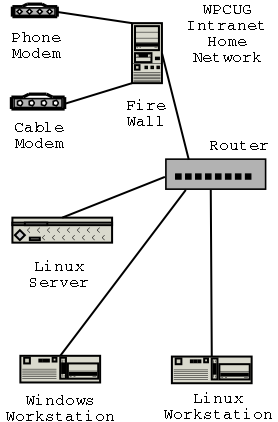
This diagram describes how a typical home network can be constructed around a Linux server. This design is only one of many that can be constructed, but it is a recommended method of configuring your home network.
Hardware Configuration
This system includes both an analog modem and a cable modem. You would not normally use both types, but it is useful to have the analog modem available if there are problems with the cable modem. If you do not have one of the items, then don’t bother installing both as they are not both needed.
Lets talk about each piece of hardware individually so we can understand it’s intended purpose and choice considerations.
- Analog Modem
- This is a normal phone modem. You will notice that I used an external modem. External modem are all Linux compatable while some of the internal modems are not. The configuration of an external serial modem is simplier, and if it fails it is more easily replaced.
Cable Modem- This could also be a DSL type modem or a Satellite modem. This type of modem allows broadband access to the internet. I will discuss a modem which connects using a 10 Base T cable. Some of these modem can also connect using USB cables. Yes many cable companies tell you that you need to use windows. Actually, once the modem is up and running, it can normally run under Linux just fine.
Fire WallThere are some routers which include internal firewalls. I normally use an old PC as a firewall and simply install Firewall software. I use IPcop but I have also used SmoothWall. I like the Open Source firewalls since they tend to be better maintained and reliable.
The reason I use a separate firewall, is that if the fire wall is attacked and broken, I can reformat the fire wall computer, and reinstall the software to plug the hole. Since I have an old computer collecting dust, it is economical as well.
Router- This is a simple run of the mill router for connecting the components of the network to one another. It can be wired or wireless as you like. Since it is behind the firewall, any router will do.
Linux ServerThis is the heart of the home network. It allows you to run a mail server, a web server, shared disk drives, and common backup from one point on the network. This is the type of application server that Linux really shines at. This computer is a standard PC, but you might want to consider a better quality computer in this location since it is the heart of the network.
A couple things to consider for this PC. It should probably have larger hard disk space since it will be sharing space with the other computers on the network. It should probably have some type of backup drive installed. Tape is still the cheapest and work well in Linux. I use SCSI disk drives on my server, it is more expensive, but also more flexable. As an example, I have 3 hard disks, one zip drive, one CD drive, one 4mm tape drive, and a scanner all running on a single Adaptec SCSI controller.
Windows Workstation- This is a normal windows computer running Windows 95, 98, 2000, or XP. We will discuss how to setup the network part of this computer for access to the Linux server and the internet.
Linux Workstation- This is a standard PC running a Linux Operating system. We will discuss how to configure this computer to share the Linux Server and the Internet. This configuration will be different than the linux server since it will be participating in the network and not hosting it.
Assumptions
For this discussion I will assume you already have Linux installed on the server and the linux workstation. If this is not the case, you need to bring the computer to an install fest, or learn how to install Linux. It is not difficult with the modern distributions, but outside the scope of this talk. For this talk, I will be using and configuring Redat Linux version 7.3. Since the tools we will be using will mostly be an editor, the instructions will likely work on most version of Linux.
Hardware selection issues are up to you. I will describe the hardware I am familiar with in the configuration steps. As with many things in Linux, there is more than one way of doing things. I will use serial ports for the analog standalone modem, and 10baseT connection for the cable modem. I will use generic hardware information mostly since this is simplier. Many variations of hardware are possible, if your configuration does not match this one, it will probably be easy to modify the instructions for your configuration.
The configuration of the windows box will reflect Windows 98. This is what I use and it works. The configuration for Windows 2000 or XP is slightly different. Again, it should be fairly straight forward to use the information on other configurations.
I will assume you already have an internet provider and you can get the information from them that you need. Many Internet providers do not directly support linux, but if you ask the right questions, they will give you the infomation you need. Often the information is posted on their web pages, you just need to find it.
Finally, I will assume you know how to use a simple editor such as vi, pico, or some other text editor. There are graphical front ends to some of the configuration, but everything can be done with an editor. Do not assume you need to go out and learn VI. We are only going to be using a couple of commands in the VI editor included with Linux known as VIM. Or if you are unsure about using VI, give the pico editor a try. It is available on most Linux system, you will need to load the pine rpm. Pico is a simple text editor, with a limited command set, but it includes on screen help.
How to connect the Hardware
- Analog Modem
- For the purpose of this talk I am going to connect the analog modem to the Firewall using a serial cable. The phone line is connected to the analog modem and it has electrical power. Plug the serial cable into Com port 1 (Windows) or /dev/ttyS0 (Linux).
Cable Modem- To connect the cable modem I would recommend using a network cable. You can install two network cards in the firewall box. We will assume you are using network card 0 (zero) to connect the cable modem to the firewall. Network card 1 (one) will connect the firewall to the router. Again, I will assume you have the cable modem working correctly with your internet provider. If not, plug the cable modem into your windows box, and have the ISP help you get things configured. You can then turn off the cable modem (for 1/2 hour) and plug it into the firewall once it is configured, usually.
Fire Wall- This box will need one serial port and two network cards. If your network cards are the same make, you should write down their MAC addresses so you know which one is which. You will need a keyboard and monitor on this box only during setup. Once it is configured, you can remove the keyboard and monitor from the box. It is administered from the Linux Server normally.
Linux Server- The server on the network is connected to the rest of the network via the router. Since this is only a simple network, everything can go through a single router. Most of the work on this box will be done in software. If you want to use a wireless router, be my guest.
Linux and Windows Workstations- I will assume you already have the Linux and Windows workstation and they connect to the router via a network cable. We will discuss configuration issues on these two boxes. Most of what is loaded on these boxes is up to you. At this point we are only interested in getting everything talking to the server and the internet.
Router- The router is a standard off the shelf router. We are only using it to connect the computers together for our network. There are many configurations and types of routers available. Again, a discussion of routers is outside this talk. Mine is a simple 10/100 base T type, so it works as a plug and play box.
Written by John F. Moore
Last Revised: Tue 01 Sep 2020 08:10:11 PM EDT

This work is licensed under a Creative Commons Attribution-NonCommercial-ShareAlike 3.0 Unported License.
